
Welcome to our tutorial and documentation section for PDD Beta. Use the search box below to find answers.
-
Food Wizard Tutorials
5 out of 5 stars
1 rating
| 5 Stars | 100% | |
| 4 Stars | 0% | |
| 3 Stars | 0% | |
| 2 Stars | 0% | |
| 1 Stars | 0% |
Kelp Help Powder
Kelp Help™ Powder combines natural omega-3, -6, and -9 fatty acids with essential trace minerals and vitamins for healthy skin and a glossy coat. Contains essential vitamins, minerals, and amino acids.
For use in dogs and cats. Kelp Help™ Powder combines the benefits of natural omega-3, 6, and 9 fatty acids with essential trace minerals and vitamins for healthy skin and a glossy coat. Contains essential vitamins, minerals, and amino acids. This is a natural product; color may vary from batch to batch. These variations do not affect the product’s nutritional value. We recommend dividing the daily amount into two equal servings, but it is not necessary.
Store in a cool, dry place. For freshness, refrigeration is recommended.
Guaranteed Analysis per 3 teaspoons.
3 teaspoons equals 3,233 mg
Calcium 0.21%
Phosphorus 0.16%
Iron 2.55 mg
Copper 0.17 mg
Zinc 0.22 mg
Vitamin A 230 IU
Vitamin D 310 IU
Vitamin E 2 IU
Riboflavin (Vitamin B2) 0.62 mg
Niacin (Vitamin B3) 1.53 mg
Vitamin B12 0.03 mg
Choline 4.2 mg
*Linolenic Acid (Omega-3) 317 mg
*Linoleic Acid (Omega-6) 2.31%
*Oleic Acid (Omega-9) 105 mg
(All values are minimum unless otherwise stated)
*Not recognized as essential nutrients by AAFCO Dog and Cat Food Nutrient Profiles.
Metabolizable Energy (ME) as fed:
4,800 kcal/kg (15.5 kcal/serving)
Preliminary Calculations
The serving size is 3 teaspoons, which weighs 3,233 milligrams. The energy value per serving is 15.5 kcal.
We will ignore Oleic Acid, as it is not required by dogs or cats. Next, we convert the nutrient percentages into milligrams.
Calcium is 0.21 % of 3,233, or (.0021) × 3,233 = 6.7893 mg
Phosphorus is 0.16 % of 3,233, or (.0016) × 3,233 = 5.1728 mg
Linoleic Acid is 2.31 % of 3,233, or (.0231) × 3,233 = 74.6823 mg
Food Wizard Tutorial
Below are screenshots showing the values we enter into Food Wizard. Open Food Wizard and enter the values as shown.
Step 1 - Add Common Measure
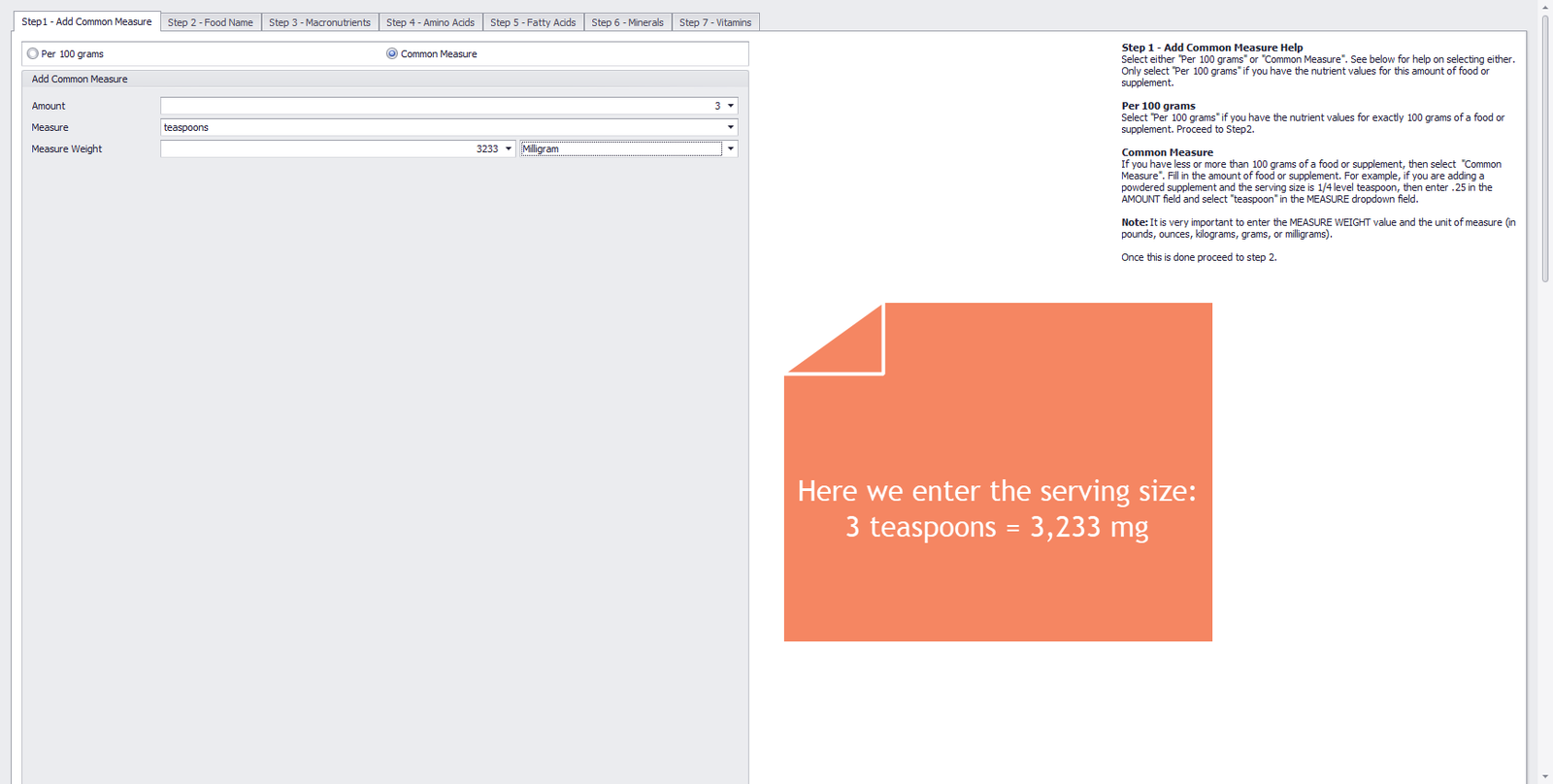
The image below shows the first tab in the Food Wizard. The guaranteed analysis shows values per serving. The serving size is 3 teaspoons, which weighs 3,233 milligrams. So we will use this as our common measure.
Enter the following values:
- 3 teaspoons = 3233 Milligram
Step 1 – Add Common Measure
Step 2 - Food Name
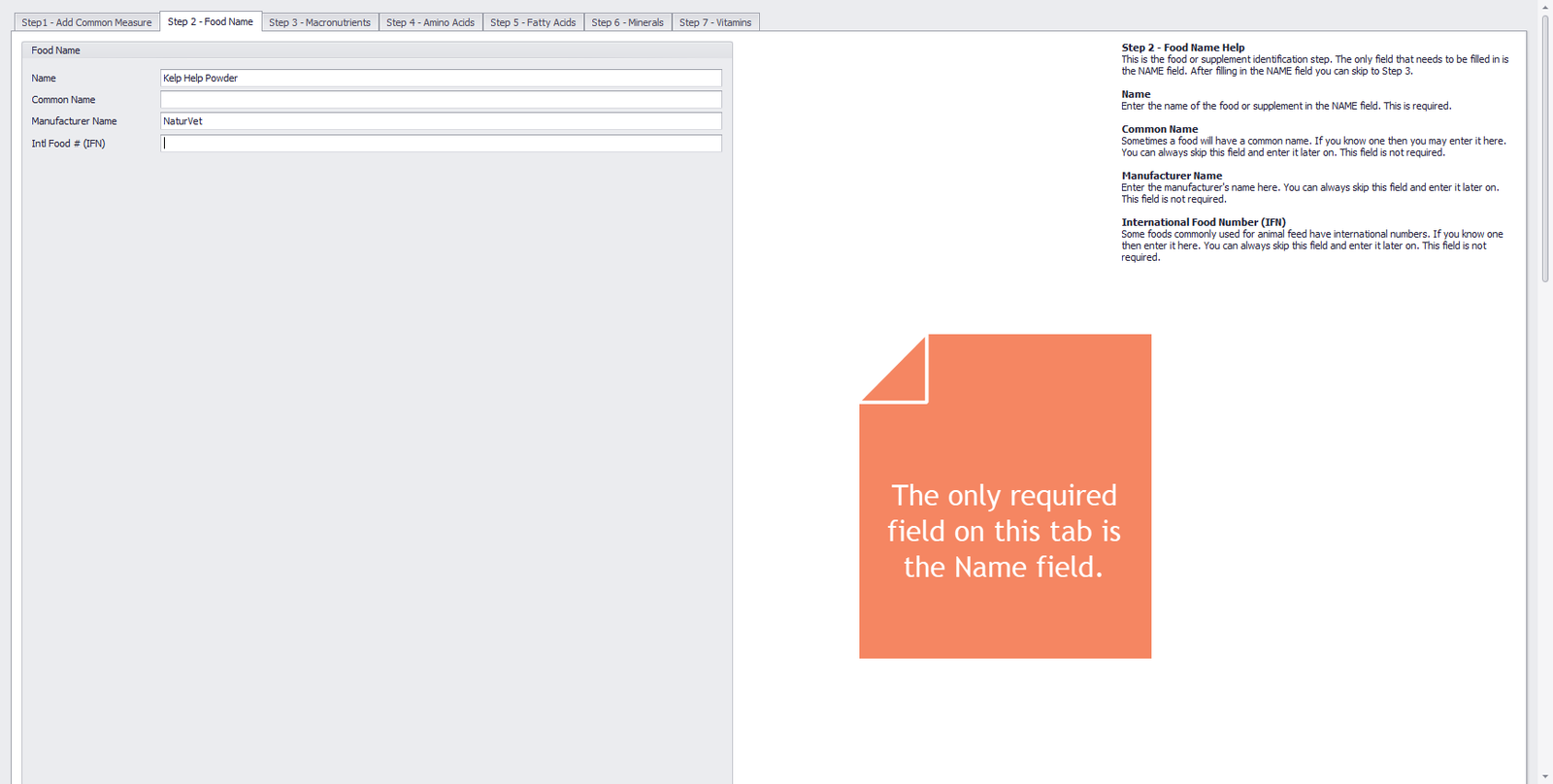
The image below shows the second tab in the Food Wizard. The only required value that you have to enter in this tab is the name of the food or supplement. We also enter the manufacturer’s name (if we know it), as it may help distinguish similar products from different manufacturers.
Enter the following values:
- Food Name = Kelp Help Powder
- Manufacturer Name = NaturVet
Step 2 – Food Name
Step 3 - Macronutrients
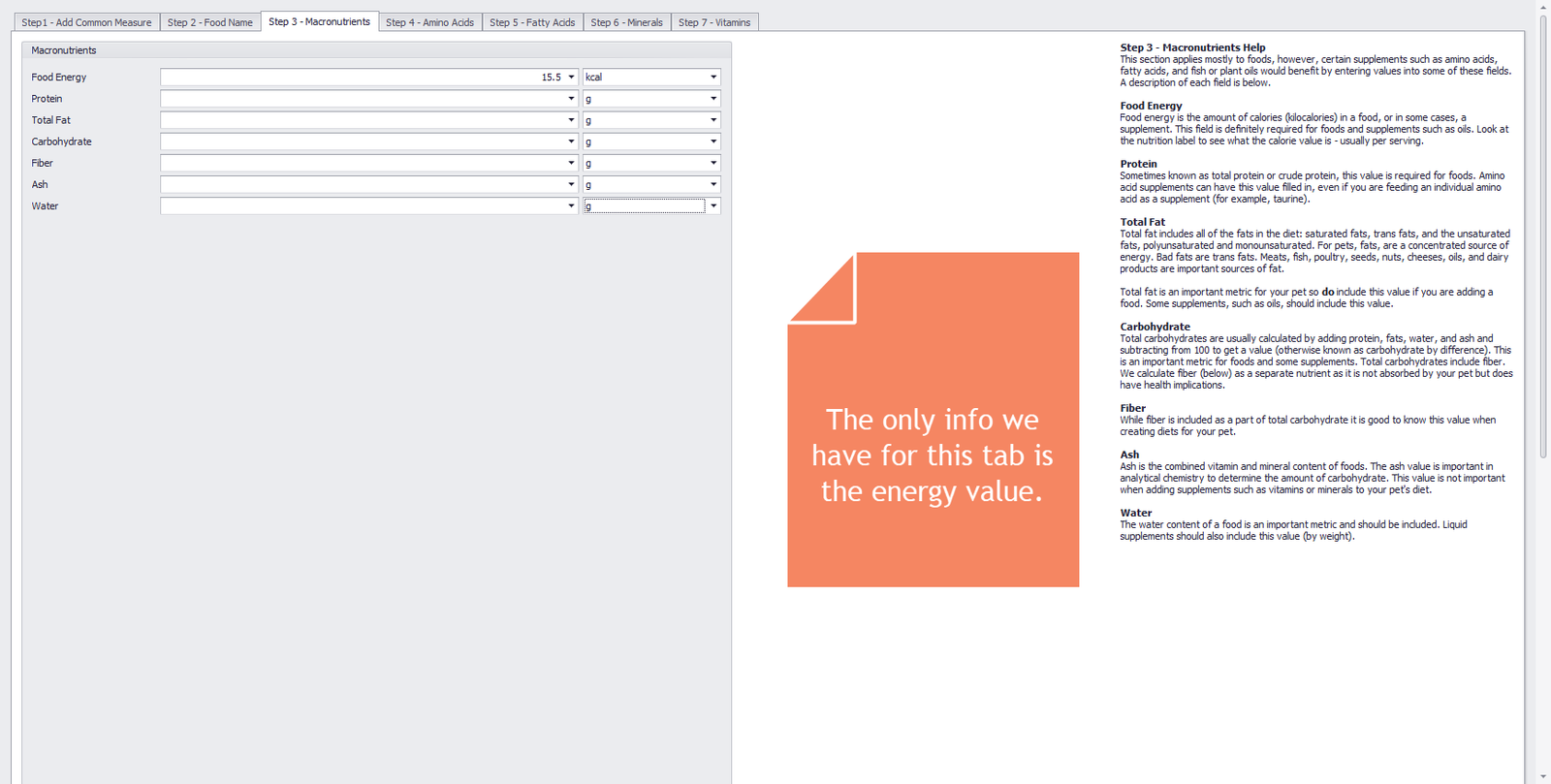
The image below shows the third tab in the Food Wizard. Enter the energy value and leave the other values blank, since we don’t have enough information.
Enter the following values:
- Food Energy = 15.5 kcal
Step 3 – Macronutrients
Step 4 - Amino Acids
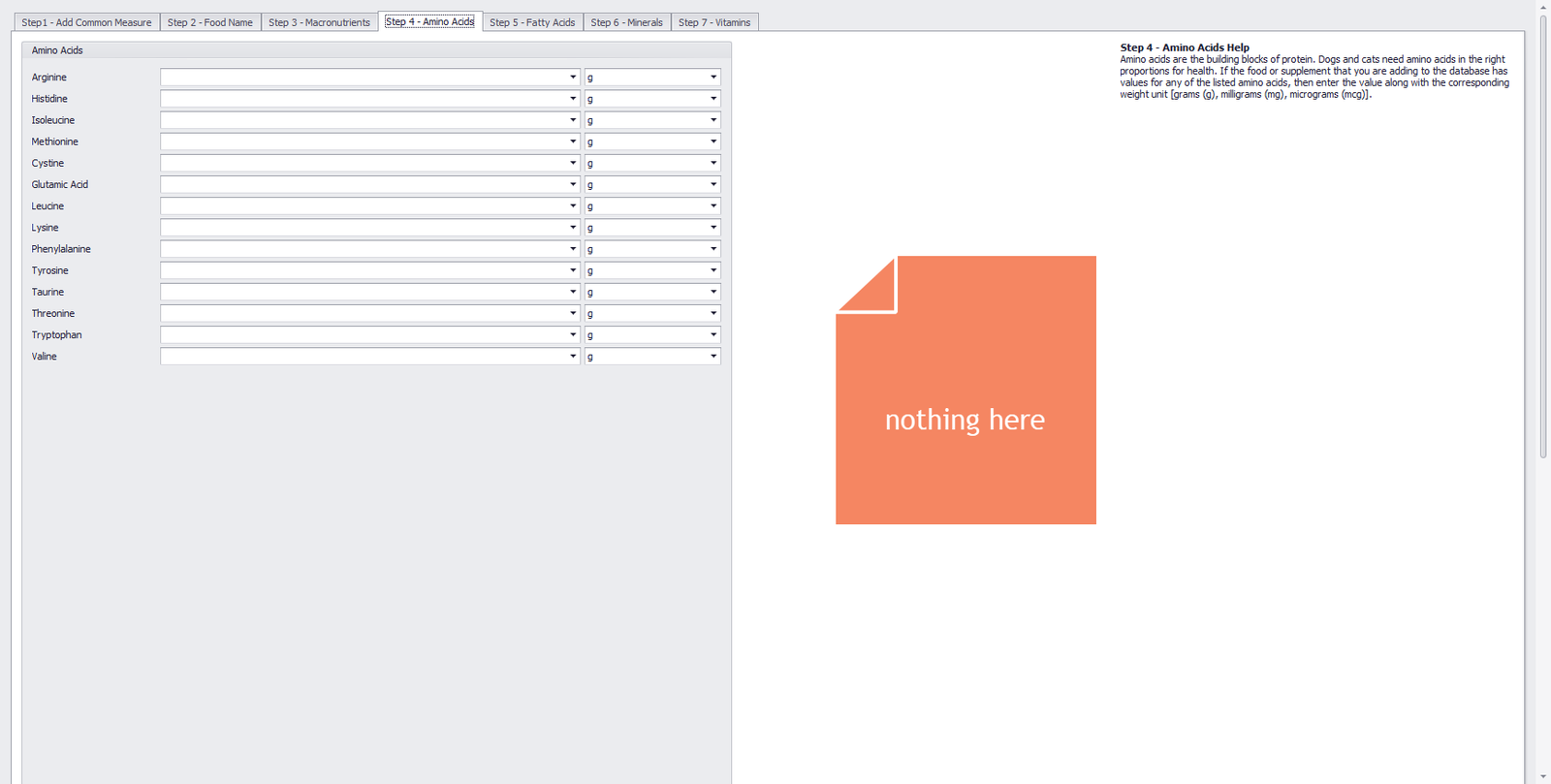
The image below shows the fourth tab in the Food Wizard. Since the typical analysis lists no amino acid values, we leave this tab blank.
Step 4 – Amino Acids
Step 5 - Fatty Acids
The image below shows the fifth tab in the Food Wizard. We enter the values for the two fatty acids listed in the guaranteed analysis. Change the unit to mg, as shown in the image below.
Enter the following values:
- Linoleic Acid (LA) = 74.6823 mg
- Alpha-Linolenic Acid (ALA) = 317 mg
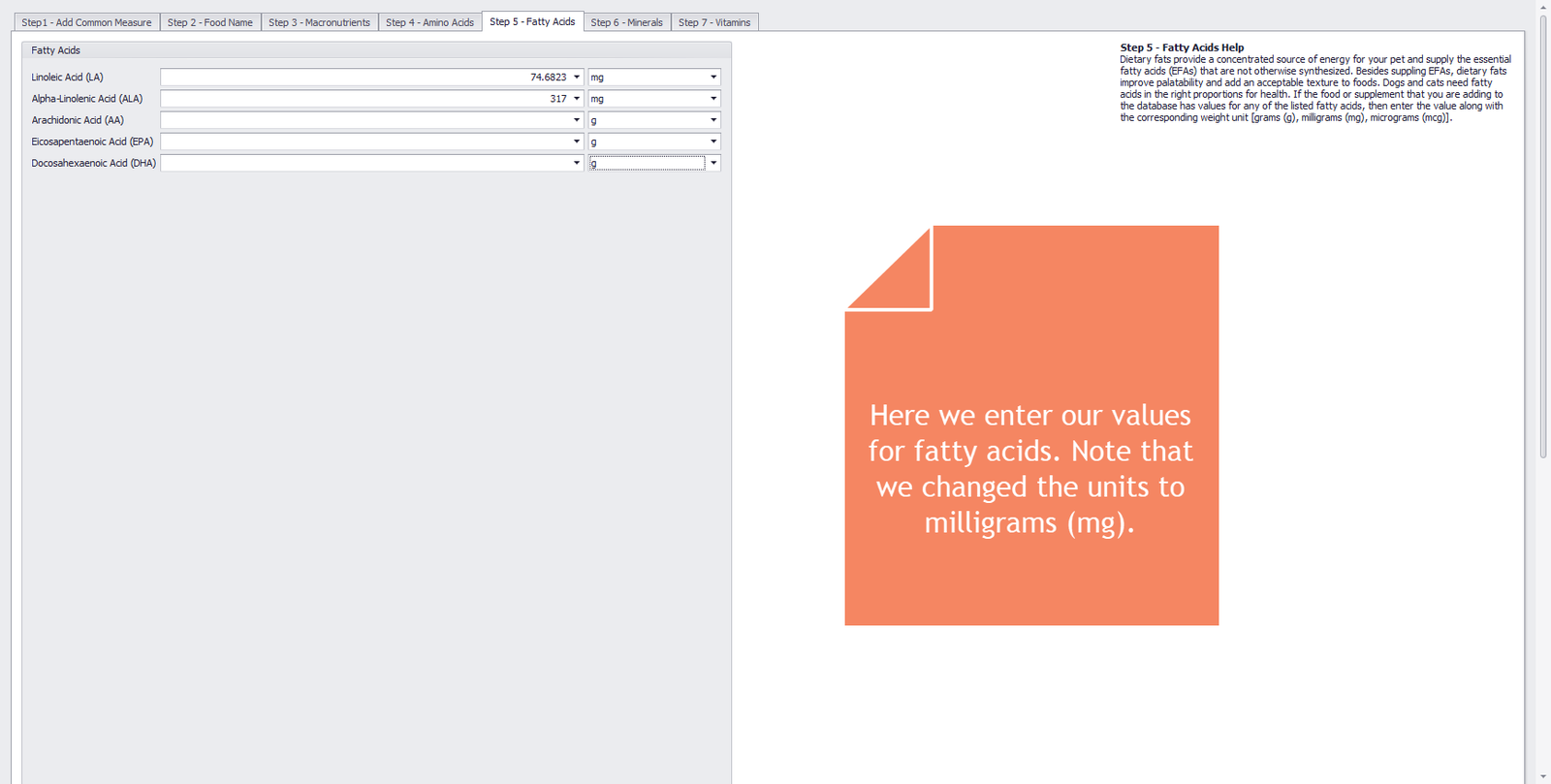
Step 5 – Fatty Acids
Step 6 - Minerals
The image below shows the sixth tab in the Food Wizard. It is straightforward to enter all mineral values. Note that the guaranteed analysis lists all minerals in milligrams except calcium and phosphorus, which we converted from percentages to milligrams (see Preliminary Calculations section).
Enter the following values:
- Calcium = 6.7893 g
- Phosphorus = 5.1728 g
- Iron = 2.55 mg
- Copper = 0.17 mg
- Zinc = 0.22 mg
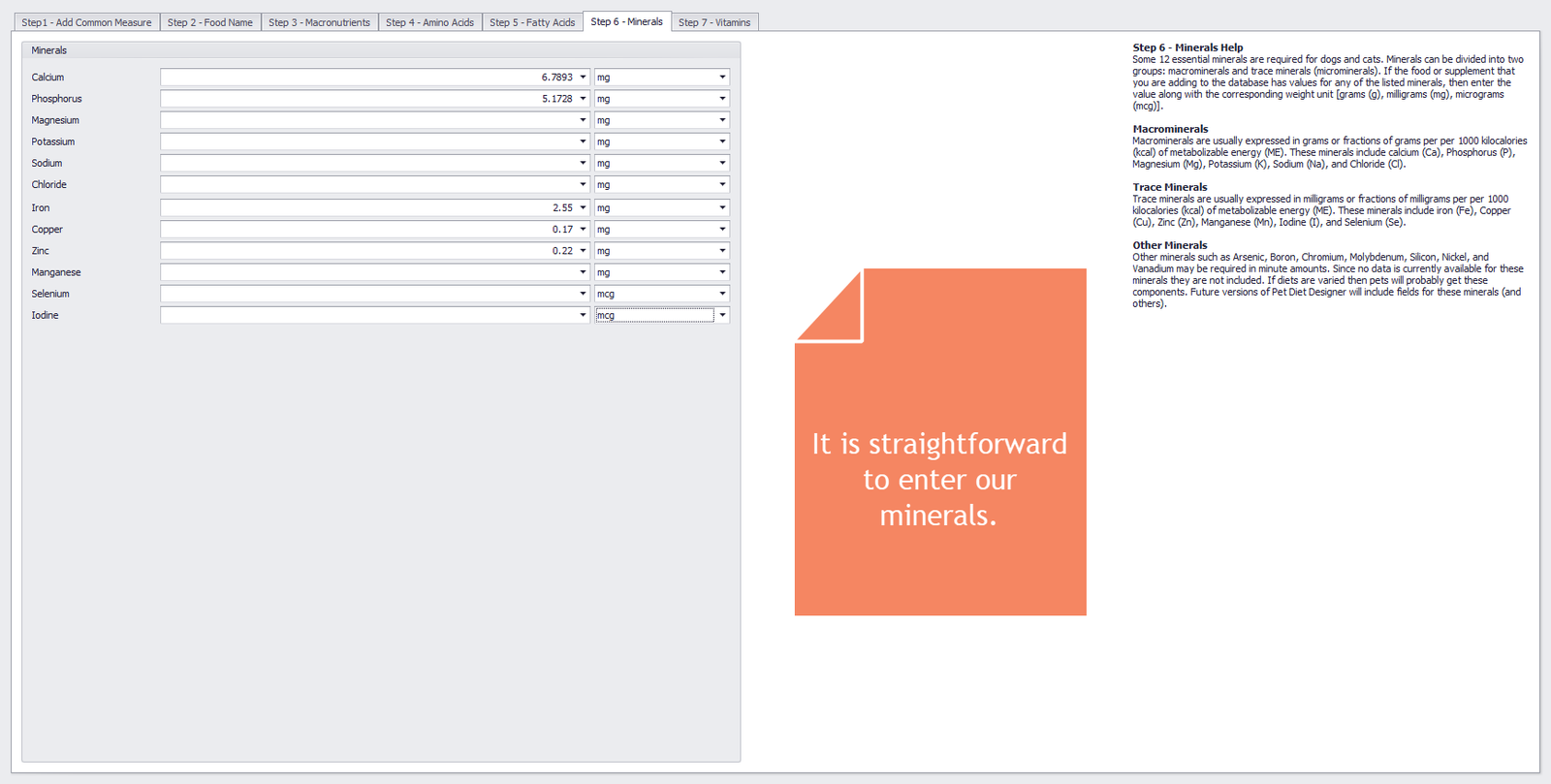
Step 6 – Minerals
Step 7 - Vitamins
The image below shows the seventh, and final, tab in the Food Wizard. You can enter the vitamin values as-is. The Vitamin A value is listed in International Units (IU). PDD accepts values for Vitamin A from either an animal (retinol) or a plant (beta-carotene) source. Since kelp is a plant, we choose to enter the Vitamin A value as “IU as beta-carotene.” We also choose to use the natural form of Vitamin E (d-alpha-tocopherol).
Enter the following values:
- Vitamin A = 230 IU as beta-carotene
- Vitamin D = 310 IU
- Vitamin E = 2 IU as D-Alpha-tocopherol
- Riboflavin (B2) = 0.62 mg
- Niacin (B3) = 1.53 mg
- Vitamin B12 = 0.03 mg
- Choline = 4.2 mg
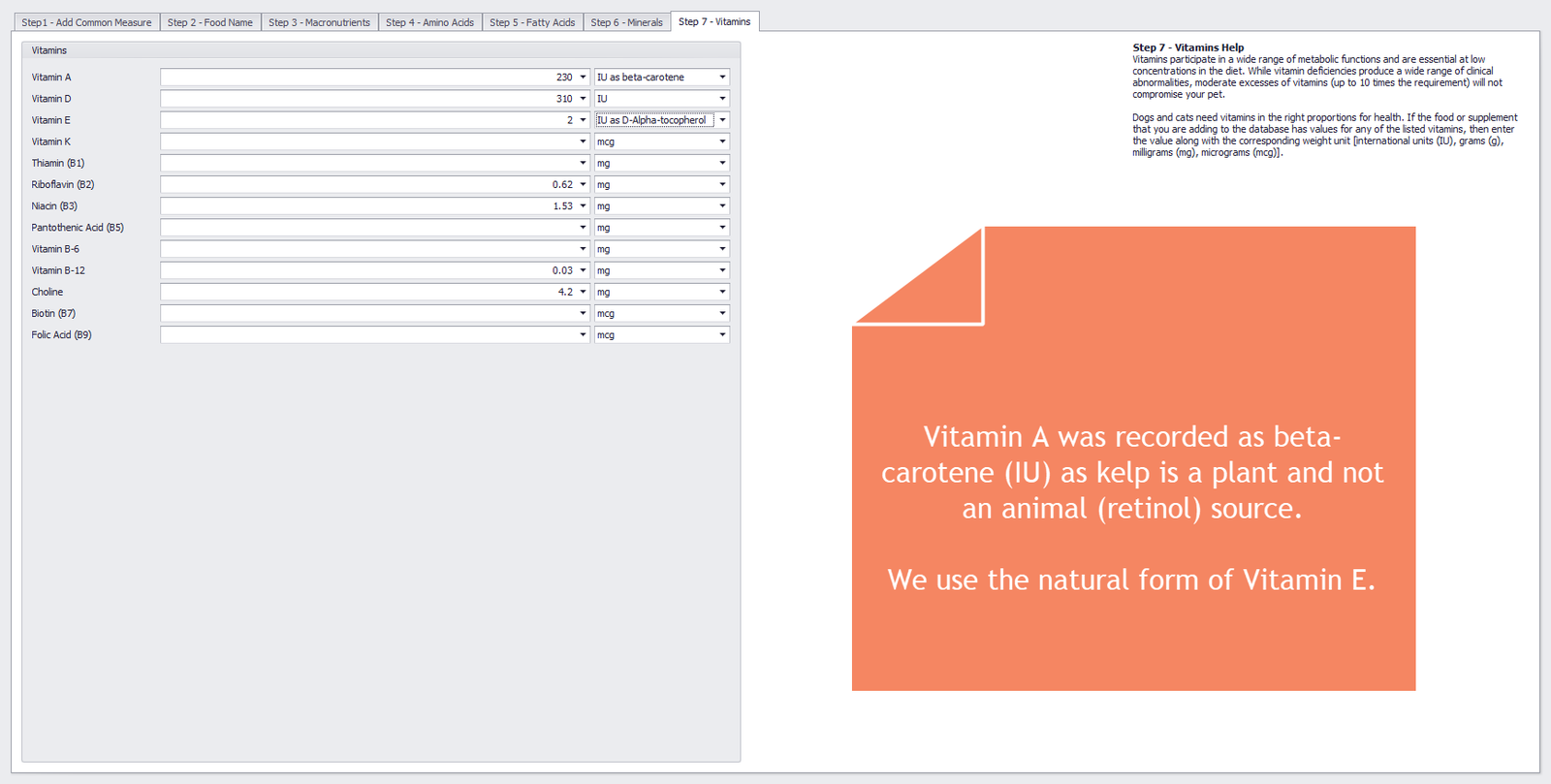
Step 7 – Vitamins
Conclusion
That’s it! Press the SAVE & CLOSE button on the ribbon, and the system converts and stores all values in the database as 100 grams of Kelp Help™ Powder. Next, we will show our new food/supplement in the Foods module. Click on the FOODS button on the ribbon to open up the Foods module.
Looking at our newly entered food
With the Foods module open, enter “NaturVet” in the search text box and click the FIND button. With the Kelp Help™ Powder entry highlighted, click on the EDIT button on the ribbon to see our newly entered values.
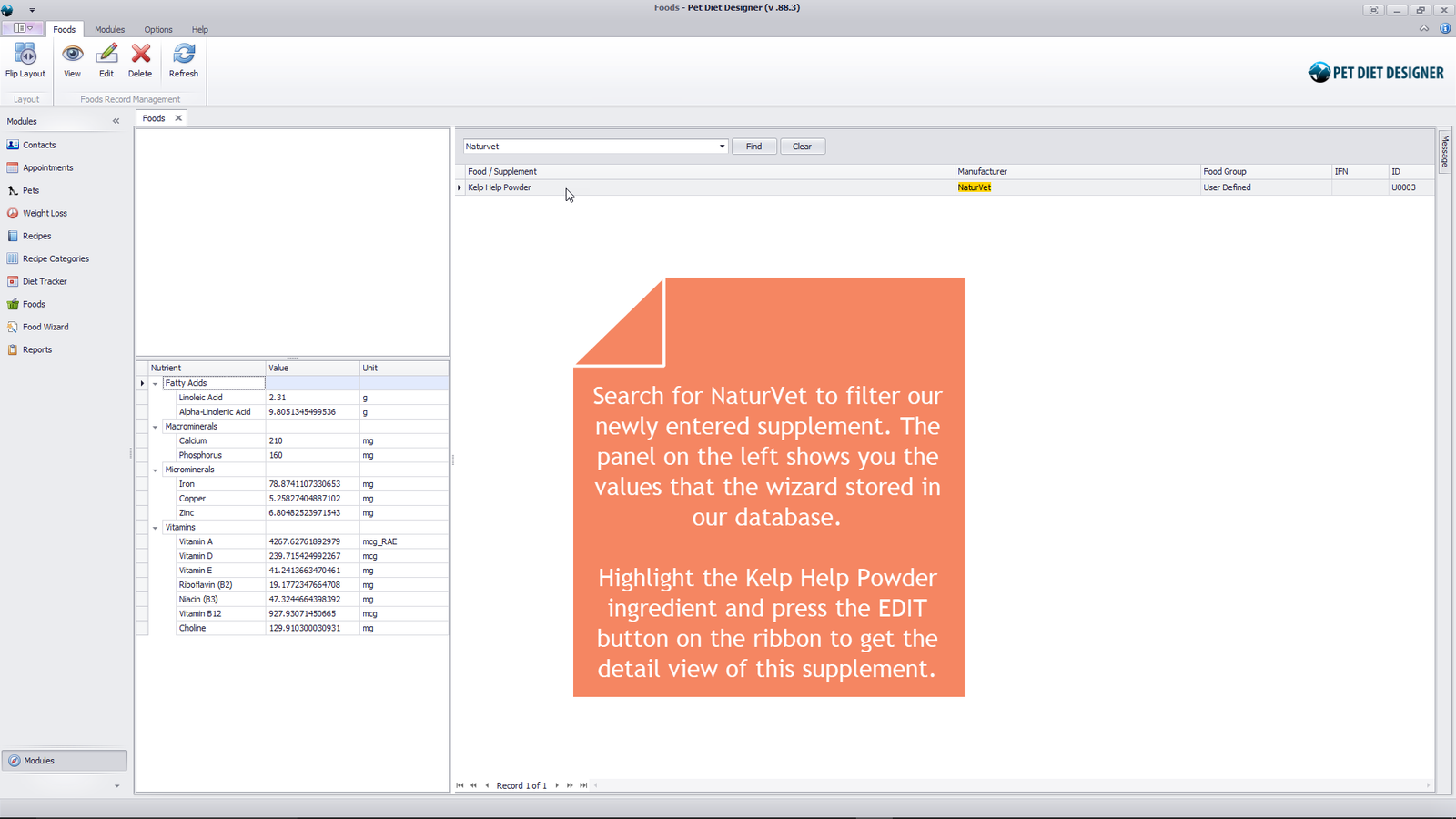
Searching for NaturVet in the Foods module.
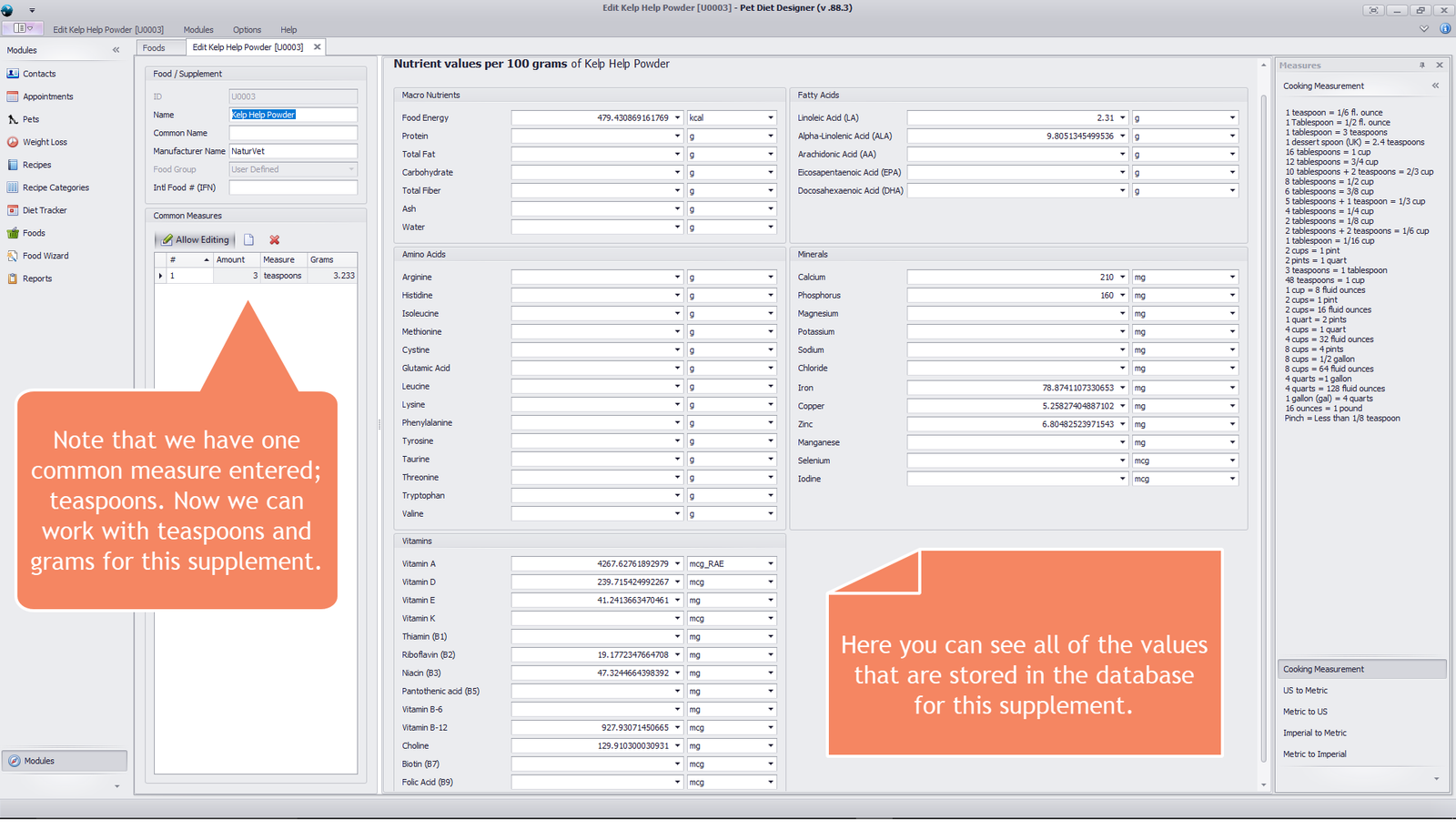
Showing nutrient detail for 100 grams of Kelp Help™ Powder.
5 out of 5 stars
1 rating
| 5 Stars | 100% | |
| 4 Stars | 0% | |
| 3 Stars | 0% | |
| 2 Stars | 0% | |
| 1 Stars | 0% |