
Welcome to our tutorial and documentation section for PDD Beta. Use the search box below to find answers.
0 out of 5 stars
| 5 Stars | 0% | |
| 4 Stars | 0% | |
| 3 Stars | 0% | |
| 2 Stars | 0% | |
| 1 Stars | 0% |
How to Balance Multiple Recipes in a Day
With Pet Diet Designer, you can balance two or more recipes per day. Recipes can be completely different, and you can also include snacks. Each meal or snack you feed may not be balanced on its own, but together, all meals and snacks can represent a balanced diet.
To balance multiple recipes, you use the “Multiple Recipes” radio button in the Recipe Balancer, along with recipes that you have recorded in the Diet Tracker module. See the video below for a tutorial.
To balance multiple recipes, you first must enter one or more recipes in the Diet Tracker module. It is best to choose a future day so you don’t interfere with your pet’s actual diet history. Then use the current recipe in the Recipe Balancer to balance your recipes. For instance, you may feed an unbalanced meal in the morning and another unbalanced meal in the evening. Taken together, both meals represent a balanced diet for your pet (even though each meal is not balanced).
This tutorial blog shows you how to balance 2 or more meals (including snacks) for a single day.
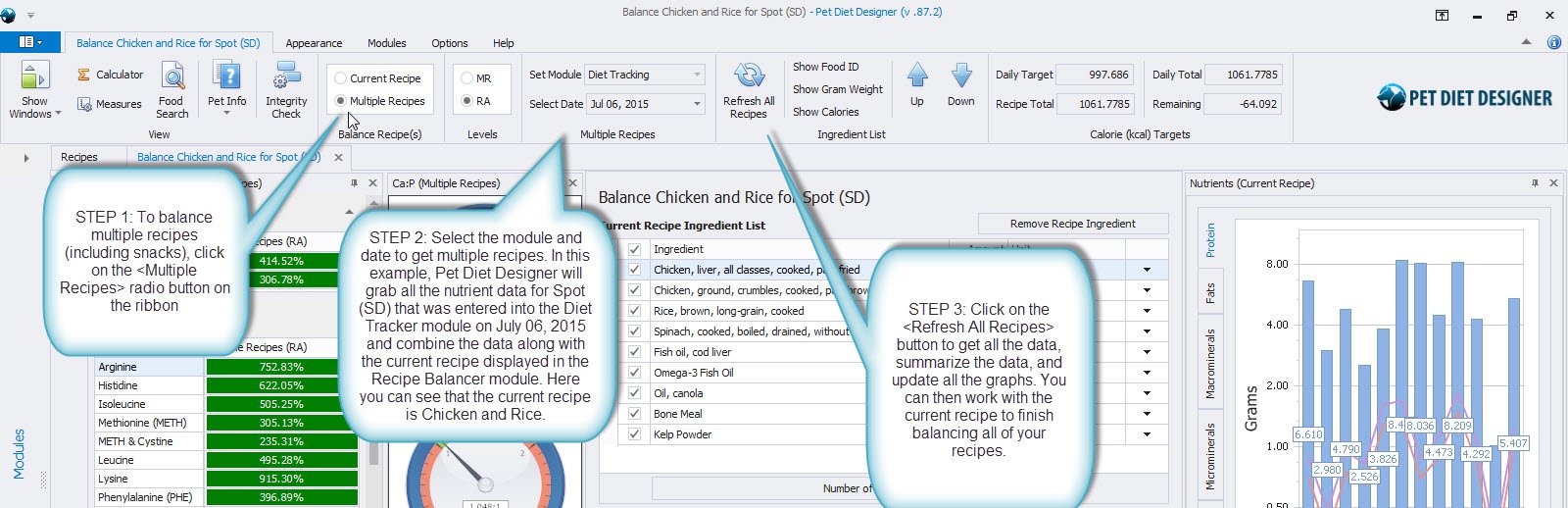
Balancing multiple meals is as easy as 1-2-3! See the image below.
HOW TO BALANCE MULTIPLE RECIPES.
STEP 1: To balance multiple recipes (including snacks), click on the radio button on the ribbon.
STEP 2: Select the module and date to get multiple recipes. In this example, Pet Diet Designer will pull all nutrient data for Spot (SD) entered in the Diet Tracker module on July 06, 2015, and combine it with the current recipe displayed in the Recipe Balancer module. Here you can see that the current recipe is Chicken and Rice.
STEP 3: Click the button to retrieve all data, summarize it, and update all graphs. Then work with the current recipe to finish balancing all your recipes.
Video Tutorial
This tutorial video shows you how to balance 2 or more recipes in a day. You can include homemade snacks too! Please watch the Diet Tracker Overview document to learn how to use the Diet Tracker module.
0 out of 5 stars
| 5 Stars | 0% | |
| 4 Stars | 0% | |
| 3 Stars | 0% | |
| 2 Stars | 0% | |
| 1 Stars | 0% |